
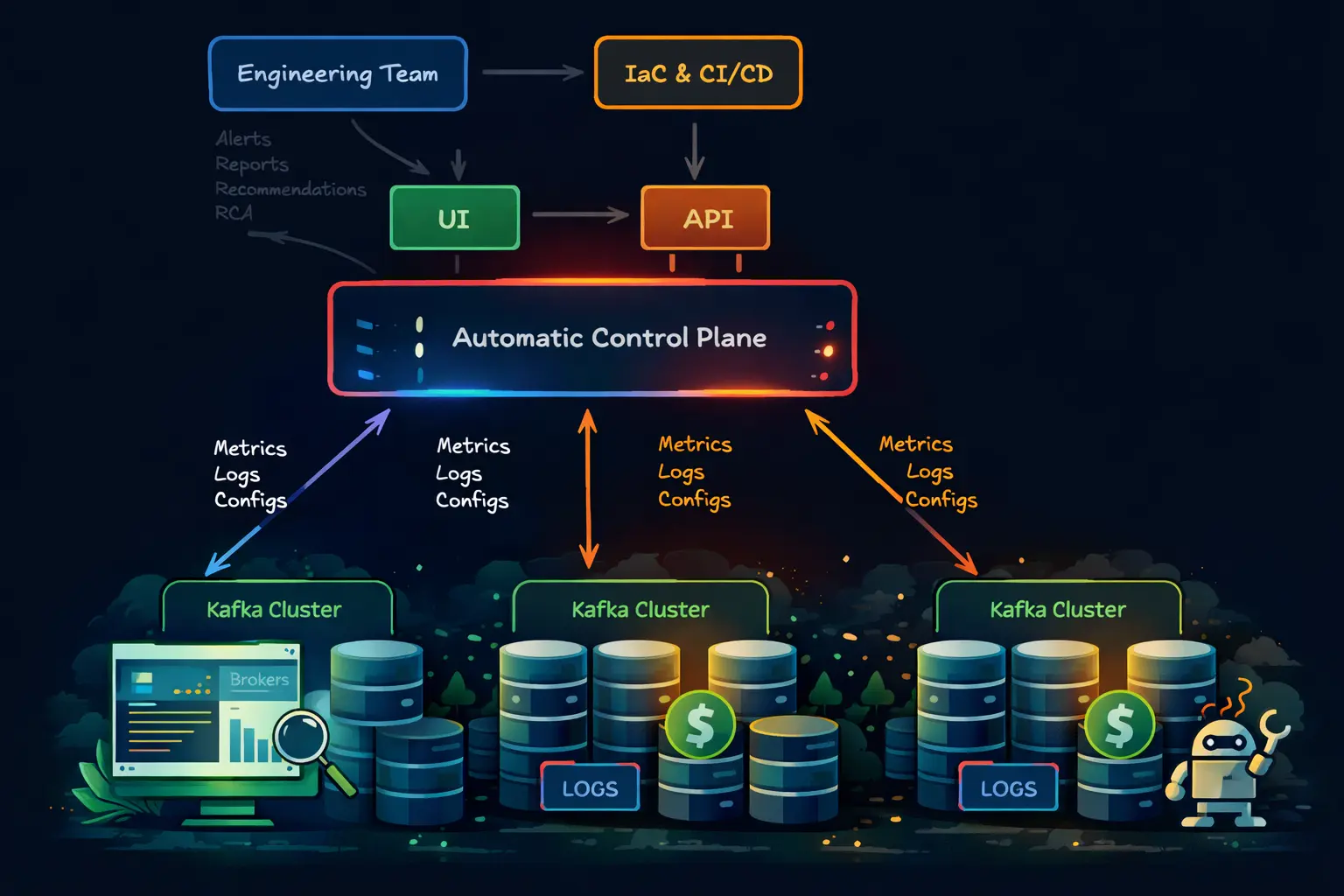
So you chose self-hosted Kafka
If you read Kafka Cost Comparison 2026: Self-Hosted vs Amazon MSK vs Confluent Cloud, the next question is obvious: how do you actually self-host Kafka and end up with a better experience than MSK or Confluent Cloud?
This post is about how to make that self-hosted choice work well in practice. Getting Kafka onto Kubernetes is only part of the job; the harder part is ending up with a platform that engineers can operate comfortably once it is in production. Strimzi and AxonOps divide that work cleanly. Strimzi handles lifecycle reconciliation, including brokers, node pools, version changes, and the Kubernetes resources that define the cluster. AxonOps handles the day-2 work, including broker health, consumer lag, topics, ACLs, logs, and the workflows engineers use during routine operations and incidents.
This post walks through the AxonOps Strimzi integration published in the axonops-containers repository and shows how to bring up a Strimzi-managed Kafka cluster that reports into AxonOps.
If you want the broader operating model behind this setup, Running Kafka at Scale Without a Platform Team covers the control-plane side in more detail.
The GitHub repository is the source of truth for this integration. It contains the AxonOps-enabled Strimzi image, the startup wrapper, the example manifests, and the cloud deployment examples. If you want to try this yourself, start with:
Deployment architecture
At a high level, the deployment is cleanly split into two layers. Strimzi watches the Kafka custom resources and reconciles controller and broker node pools inside Kubernetes. The AxonOps-enabled Kafka image then starts the AxonOps agent inside those same pods, so metrics, logs, and operational metadata flow out to AxonOps without changing how Strimzi manages the cluster.
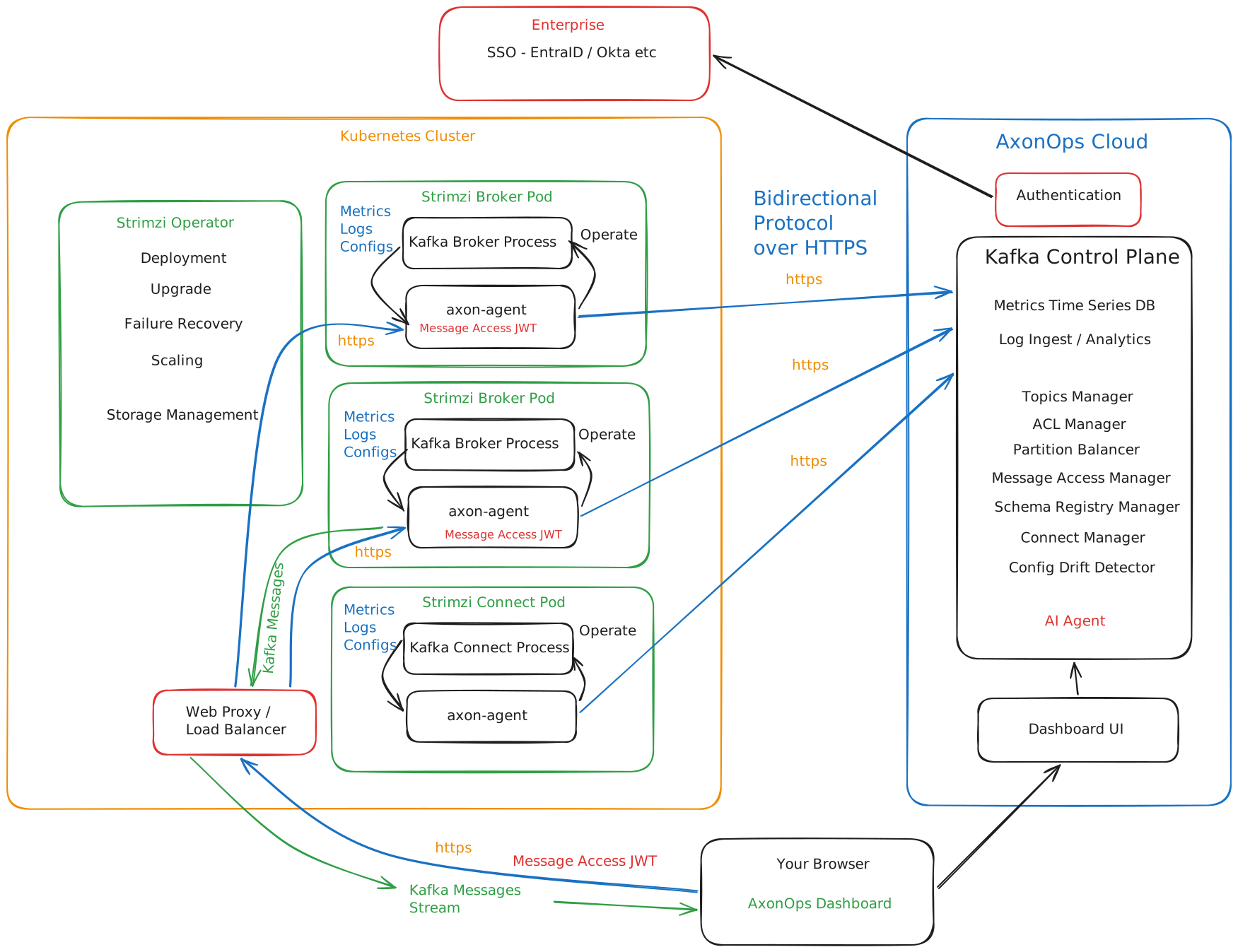
There are four practical points to take from this layout:
- Strimzi still owns the Kafka lifecycle and Kubernetes reconciliation.
- The AxonOps agent starts inside each Kafka pod rather than as a separate external scraper.
- Broker and controller roles are identified through the
KAFKA_NODE_TYPEenvironment variable in each node pool. - Engineers work from AxonOps for monitoring and day-2 operations while leaving pod orchestration to Strimzi.
What teams usually want from a Kafka platform
Teams moved toward MSK and Confluent for understandable reasons: easier rollouts, a cleaner upgrade story, built-in monitoring, simpler security administration, and less time spent assembling Kafka tooling around the cluster.
The important point here is that a self-hosted Kafka platform no longer has to give up those qualities. With Strimzi looking after the Kubernetes and broker lifecycle, and AxonOps covering monitoring, alerting, logs, lag, topics, ACLs, and AI-assisted diagnosis, most of the practical reasons teams moved to MSK or Confluent are now covered in an open self-hosted model as well. What remains with self-hosting is the part some teams actively want: control over the infrastructure, the Kafka version, the network boundaries, and the cost profile.
Most of the practical reasons teams buy MSK or Confluent can now be covered by a Strimzi plus AxonOps deployment as well.
| Capability teams usually expect from MSK/Confluent | MSK/Confluent | Strimzi + AxonOps |
|---|---|---|
| Broker lifecycle management | Yes | Yes, via Strimzi |
| Monitoring, lag, logs, and alerting | Yes | Yes, via AxonOps |
| Topic and ACL administration | Yes | Yes, in AxonOps |
| Terraform-driven platform management | Yes | Yes, with Terraform |
| Faster diagnosis during incidents | Yes | Yes, with AI-assisted diagnosis |
| Open Kafka with infrastructure control | No, not in the same way | Yes |
What the AxonOps Strimzi image changes
The AxonOps Strimzi image starts from the official Strimzi Kafka base image and adds the AxonOps agent packages during the image build. In the current Dockerfile, the image:
- installs the core
axon-agent - installs the Kafka-specific AxonOps agent package
- injects an AxonOps wrapper into the Strimzi Kafka startup scripts
- creates a persistent AxonOps state location under Kafka data volume
0 - starts the AxonOps agent when the broker or controller process starts
That last detail is important. The integration is not trying to replace Strimzi’s reconciliation loop. Strimzi still owns the Kafka process lifecycle. The AxonOps wrapper simply ensures the Java agent and supporting process are started in the same pod so metrics and logs are reported automatically.
The current wrapper script does three notable things:
- It appends the AxonOps Java agent to
KAFKA_OPTS. - It copies AxonOps state into
/var/lib/kafka/data-0/axonopsso the agent state survives normal restarts. - It handles role-specific details such as
controller.logsymlinking for KRaft controllers.
That is why the example broker node pool contains a comment saying AxonOps requires a storage volume with index 0. The wrapper expects that layout.
Prerequisites
The current Strimzi integration in the AxonOps containers repository assumes:
- Kubernetes
1.24+ - Helm
3.x kubectl- a running AxonOps environment and API key
- Strimzi in KRaft mode
The example manifests in the development branch are based on:
- Strimzi
0.50.0 - Kafka
4.1.1 - separate controller and broker node pools
ZooKeeper mode is not the target here. The published integration is KRaft-first.
Install the Strimzi operator
There are two sensible ways to deploy this integration. The repository examples use rendered YAML with envsubst. If your platform is already managed through Terraform, the same deployment can live in that workflow as well.
Option 1: follow the published manifests
Start by installing Strimzi itself:
helm repo add strimzi https://strimzi.io/charts/
helm install my-strimzi-kafka-operator strimzi/strimzi-kafka-operator \
  --version 0.46.0 \
  --set watchAnyNamespace=true
Then create the namespace for Kafka:
kubectl create namespace kafkaThis is the quickest way to follow the published examples and it matches the rest of this post.
Option 2: manage the deployment in Terraform
If you want the deployment managed through Terraform, the clean split is:
helm_releasefor the Strimzi operatorkubernetes_secret_v1for the AxonOps settingskubernetes_manifestfor the loggingConfigMap, controller pool, broker pool, andKafkaresource
A minimal starting point looks like this:
terraform {
  required_providers {
    helm = {
      source  = "hashicorp/helm"
      version = "~> 2.14"
    }
    kubernetes = {
      source  = "hashicorp/kubernetes"
      version = "~> 2.30"
    }
  }
}

provider "helm" {
  kubernetes {
    config_path = var.kubeconfig_path
  }
}

provider "kubernetes" {
  config_path = var.kubeconfig_path
}

resource "kubernetes_namespace" "kafka" {
  metadata {
    name = var.kafka_namespace
  }
}

resource "helm_release" "strimzi" {
  name       = "strimzi-operator"
  repository = "https://strimzi.io/charts/"
  chart      = "strimzi-kafka-operator"
  version    = "0.46.0"
  namespace  = kubernetes_namespace.kafka.metadata[0].name

  set {
    name  = "watchAnyNamespace"
    value = "true"
  }
}

resource "kubernetes_secret_v1" "axonops" {
  metadata {
    name      = "axonops-config"
    namespace = kubernetes_namespace.kafka.metadata[0].name
  }

  type = "Opaque"

  string_data = {
    AXON_AGENT_CLUSTER_NAME = var.cluster_name
    AXON_AGENT_ORG          = var.axonops_org
    AXON_AGENT_KEY          = var.axonops_key
    AXON_AGENT_SERVER_HOST  = var.axonops_host
    AXON_AGENT_SERVER_PORT  = tostring(var.axonops_port)
    AXON_AGENT_TLS_MODE     = "TLS"
  }
}
From there, render the Strimzi resources as templates and apply them with kubernetes_manifest:
resource "kubernetes_manifest" "controller_pool" {
  depends_on = [helm_release.strimzi, kubernetes_secret_v1.axonops]

  manifest = yamldecode(templatefile("${path.module}/manifests/kafka-node-pool-controller.yaml.tftpl", {
    kafka_namespace       = var.kafka_namespace
    cluster_name          = var.cluster_name
    kafka_version         = var.kafka_version
    kafka_container_image = var.kafka_container_image
    axonops_secret_name   = kubernetes_secret_v1.axonops.metadata[0].name
  }))
}

resource "kubernetes_manifest" "broker_pool" {
  depends_on = [helm_release.strimzi, kubernetes_secret_v1.axonops]

  manifest = yamldecode(templatefile("${path.module}/manifests/kafka-node-pool-brokers.yaml.tftpl", {
    kafka_namespace       = var.kafka_namespace
    cluster_name          = var.cluster_name
    kafka_version         = var.kafka_version
    kafka_container_image = var.kafka_container_image
    axonops_secret_name   = kubernetes_secret_v1.axonops.metadata[0].name
  }))
}

resource "kubernetes_manifest" "kafka_cluster" {
  depends_on = [
    helm_release.strimzi,
    kubernetes_manifest.controller_pool,
    kubernetes_manifest.broker_pool
  ]

  manifest = yamldecode(templatefile("${path.module}/manifests/kafka-cluster.yaml.tftpl", {
    kafka_namespace       = var.kafka_namespace
    cluster_name          = var.cluster_name
    kafka_version         = var.kafka_version
    kafka_container_image = var.kafka_container_image
  }))
}
Inside the broker and controller templates, reference the AxonOps values from the secret rather than writing them inline:
env:
  - name: KAFKA_NODE_TYPE
    value: kraft-broker
  - name: AXON_AGENT_CLUSTER_NAME
    valueFrom:
      secretKeyRef:
        name: ${axonops_secret_name}
        key: AXON_AGENT_CLUSTER_NAME
  - name: AXON_AGENT_ORG
    valueFrom:
      secretKeyRef:
        name: ${axonops_secret_name}
        key: AXON_AGENT_ORG
  - name: AXON_AGENT_KEY
    valueFrom:
      secretKeyRef:
        name: ${axonops_secret_name}
        key: AXON_AGENT_KEY
The rest of this post follows the published envsubst path from the repository examples, but the same values and resource ordering apply if you are using Terraform.
Prepare the Strimzi and AxonOps settings
The cloud examples in the repository use a sourced environment file and envsubst to render the manifests. The current strimzi-config.env in the example set includes values such as:
export KAFKA_NAMESPACE=kafka
export STRIMZI_CLUSTER_NAME=axonops-kafka
export KAFKA_VERSION=4.1.1
export KAFKA_CONTAINER_IMAGE=ghcr.io/axonops/strimzi/kafka:0.50.0-4.1.1-2.0.19-0.1.12

export STRIMZI_BROKER_REPLICAS=6
export STRIMZI_CONTROLLER_REPLICAS=3

export AXON_AGENT_CLUSTER_NAME=$STRIMZI_CLUSTER_NAME
export AXON_AGENT_ORG=example
export AXON_AGENT_KEY=CHANGEME
export AXON_AGENT_SERVER_HOST=agents.axonops.cloud
export AXON_AGENT_SERVER_PORT=443
export AXON_AGENT_TLS_MODE=TLS
For a first deployment, the fields you need to set carefully are:
STRIMZI_CLUSTER_NAMEKAFKA_CONTAINER_IMAGEAXON_AGENT_CLUSTER_NAMEAXON_AGENT_ORGAXON_AGENT_KEYAXON_AGENT_SERVER_HOSTAXON_AGENT_SERVER_PORTAXON_AGENT_TLS_MODE
Then load them into your shell:
source strimzi-config.envIf you are following the published examples directly, use examples/strimzi/cloud/strimzi-config.env as the starting point rather than recreating the file by hand.
The key Strimzi resources
The example deployment is made of four core resources:
- one
Kafkaresource - one controller
KafkaNodePool - one broker
KafkaNodePool - one logging
ConfigMap
The Kafka resource enables both node pools and KRaft:
metadata:
  annotations:
    strimzi.io/node-pools: enabled
    strimzi.io/kraft: enabled
spec:
  kafka:
    version: ${KAFKA_VERSION}
    image: ${KAFKA_CONTAINER_IMAGE}
That image line is the key hand-off. You are still deploying a normal Strimzi-managed Kafka cluster, but the Kafka container image now includes the AxonOps agent components.
The broker and controller node pools then tell AxonOps what each pod is supposed to be. The examples do that with pod-level environment variables:
env:
  - name: KAFKA_NODE_TYPE
    value: kraft-broker
  - name: AXON_AGENT_CLUSTER_NAME
    value: "${AXON_AGENT_CLUSTER_NAME}"
  - name: AXON_AGENT_ORG
    value: "${AXON_AGENT_ORG}"
  - name: AXON_AGENT_SERVER_HOST
    value: "${AXON_AGENT_SERVER_HOST}"
  - name: AXON_AGENT_SERVER_PORT
    value: "${AXON_AGENT_SERVER_PORT}"
  - name: AXON_AGENT_TLS_MODE
    value: "${AXON_AGENT_TLS_MODE}"
  - name: AXON_AGENT_KEY
    value: "${AXON_AGENT_KEY}"
Controllers use the same pattern, except KAFKA_NODE_TYPE is set to kraft-controller.
One subtle point is worth calling out. The example directory also includes axonops-config-secret.yaml, but the node-pool manifests in the current development branch still render AxonOps values directly through envsubst. If you prefer to keep credentials in Kubernetes Secrets rather than rendered manifest values, adapt those env: entries to use valueFrom.secretKeyRef.
The exact files behind this section are all in the repository:
axonops-config-secret.yamlkafka-cluster.yamlkafka-node-pool-controller.yamlkafka-node-pool-brokers.yaml
Deploy the manifests in the right order
The example cloud README uses the following order:
envsubst < axonops-config-secret.yaml | kubectl apply -f -
envsubst < kafka-logging-cm.yaml | kubectl apply -f -
envsubst < kafka-node-pool-controller.yaml | kubectl apply -f -
envsubst < kafka-node-pool-brokers.yaml | kubectl apply -f -
envsubst < kafka-cluster.yaml | kubectl apply -f -
The important dependency is that the Kafka resource must come after the node pools, because the cluster is declared with node pools already enabled.
Once applied, watch the pods come up:
kubectl get pods -n ${KAFKA_NAMESPACE} --watchRack awareness and topology spread
The example manifests are already laid out for multi-zone scheduling.
The Kafka resource sets:
rack:
  topologyKey: topology.kubernetes.io/zone
The controller node pool also uses topologySpreadConstraints against the same topology key. If you are on EKS, GKE, or AKS, that label is usually correct as-is. If your environment uses a different label, inspect the node labels first and change the manifests before deployment:
kubectl get nodes -o jsonpath='{range .items[*]}{.metadata.name}{"\n"}{.metadata.labels}{"\n\n"}{end}' | grep -E "topology|zone|region"Logging and what AxonOps expects
The example kafka-cluster.yaml writes Kafka logs to /var/log/kafka/server.log. That matters because the AxonOps integration expects Kafka logs to live in the pod filesystem where the agent can collect them.
For KRaft controllers, the wrapper also creates a controller.log symlink because Strimzi logs controller output as server.log while AxonOps expects the controller log name separately.
That arrangement keeps the logging model simple:
- Strimzi still starts Kafka normally
- Kafka writes to
/var/log/kafka - AxonOps reads the logs from the broker or controller pod
If you want to go deeper on Kafka monitoring and log collection once the cluster is live, the AxonOps Kafka monitoring page shows the operational surface that sits on top of this deployment.
Verifying that AxonOps is connected
The first checks are still Kubernetes checks:
kubectl get pods -n ${KAFKA_NAMESPACE}
kubectl describe pod <pod-name> -n ${KAFKA_NAMESPACE}
kubectl logs <pod-name> -n ${KAFKA_NAMESPACE}
Then inspect the AxonOps processes inside a broker pod:
kubectl exec <pod-name> -n ${KAFKA_NAMESPACE} -- ps aux | grep axon
kubectl exec <pod-name> -n ${KAFKA_NAMESPACE} -- tail -f /var/log/axonops/axon-agent.log
If the pod is healthy but nothing appears in AxonOps, the usual causes are:
- wrong
AXON_AGENT_KEY - wrong
AXON_AGENT_SERVER_HOST - wrong
AXON_AGENT_SERVER_PORT - wrong
AXON_AGENT_TLS_MODE - blocked egress from the Kubernetes cluster to AxonOps
Optional Kafka Connect
The example set also includes a kafka-connect.yaml manifest. The development branch README describes Kafka Connect support as beta, with Connect workers reporting to AxonOps using the connect node type.
That is useful if you want AxonOps to cover more than brokers. It means you can keep:
- brokers
- consumer groups
- ACLs
- topics
- Schema Registry
- Connect workers
inside one operational surface rather than splitting them across separate dashboards and scripts.
If you are looking at the broader Kafka operating picture around those domains, the Kafka overview page and Schema Registry feature page are the natural next steps.
Common issues during first setup
Three problems come up repeatedly during first-time Strimzi deployments.
1. Storage class mismatch
If your broker or controller PVCs stay pending, the most common cause is that STRIMZI_BROKER_STORAGE_CLASS or STRIMZI_CONTROLLER_STORAGE_CLASS does not match a real StorageClass in the cluster.
2. Wrong topology key
If controllers or brokers do not spread the way you expect, check the node labels rather than guessing. A correct topologyKey is required for both rack awareness and pod spread behaviour.
3. Volume 0 changed or removed
The current AxonOps wrapper expects to persist agent state under Kafka data volume 0. If you redesign the broker storage layout, keep that requirement in mind.
Why this split works operationally
The real value in this setup is not that it puts another agent inside a Kafka pod. The value is that it keeps a clean separation of responsibilities.
Strimzi owns:
- Kafka process lifecycle
- node pools
- upgrades
- storage layout
- Kubernetes-native reconciliation
AxonOps owns:
- broker and cluster monitoring
- logs
- topic and ACL operations
- alerting
- consumer-group visibility
- the operational surface engineers use each day
That is a stronger model than trying to force Strimzi to become an operations console, and it is also stronger than running Kafka on Kubernetes with no control plane above it.
What you get once the cluster is live
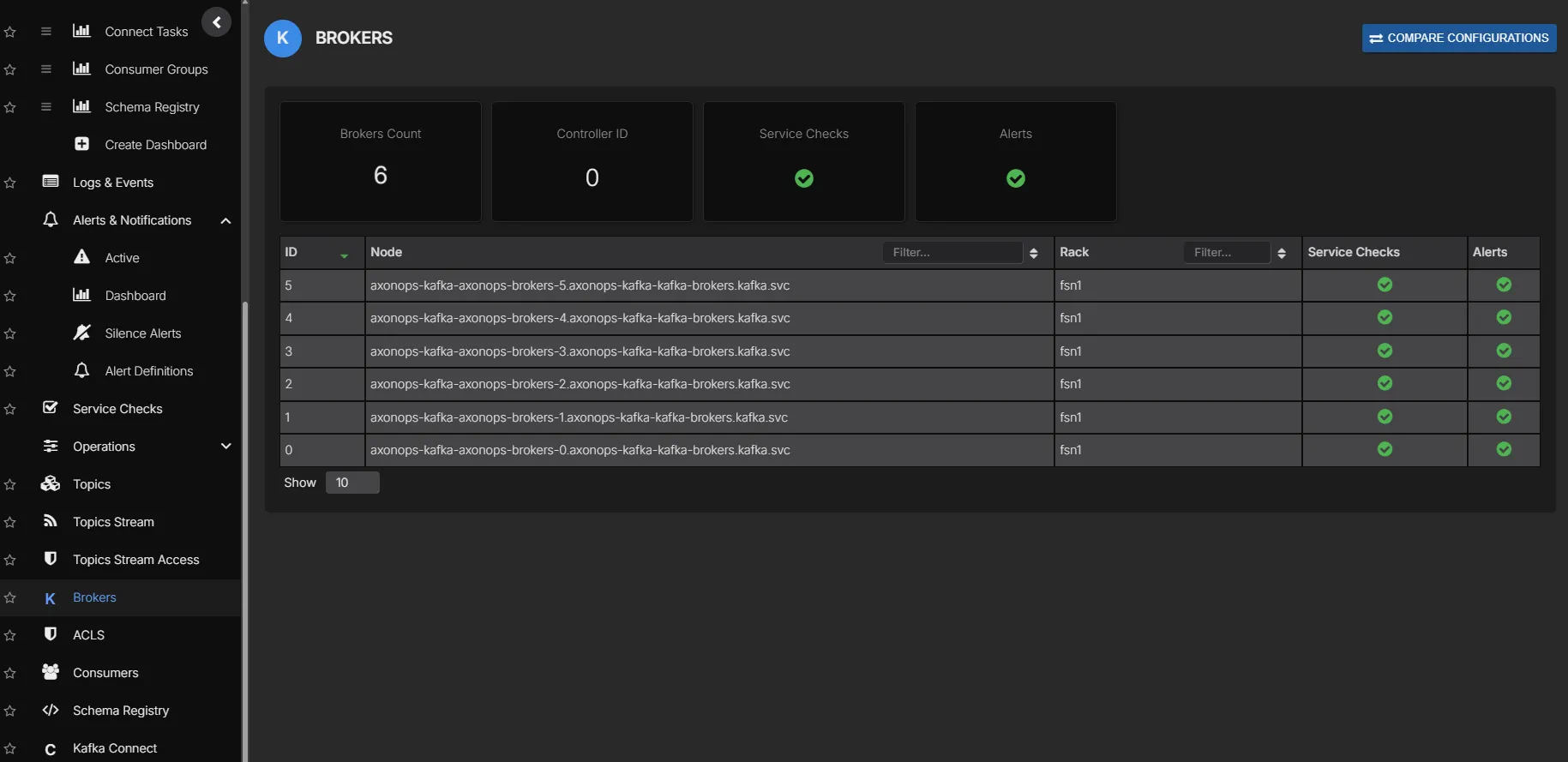
Once the cluster is reporting into AxonOps, engineers are not left staring at raw Kubernetes resources and ad hoc shell commands. They get a proper UI for brokers, consumer groups, topics, ACLs, logs, alerts, and day-2 Kafka work. That is the part that makes this deployment feel much closer to the experience teams expect from MSK or Confluent, while still keeping Kafka open and self-hosted.
Managing topics and ACLs with Terraform
If you want Kafka administration to stay in the same Git-driven workflow as the cluster deployment, the AxonOps Terraform provider supports Kafka topics and ACLs directly.
A provider block for a self-hosted AxonOps deployment looks like this:
provider "axonops" {
  org_id           = var.axonops_org_id
  api_key          = var.axonops_api_key
  axonops_host     = var.axonops_host
  axonops_protocol = "https"
  token_type       = "Bearer"
}
A Kafka topic can then be declared like this:
resource "axonops_kafka_topic" "orders" {
  cluster_name       = var.cluster_name
  name               = "orders"
  partitions         = 12
  replication_factor = 3

  config = {
    cleanup_policy      = "delete"
    retention_ms        = "604800000"
    min_insync_replicas = "2"
  }
}
Producer and consumer access can be managed in the same way:
resource "axonops_kafka_acl" "orders_producer" {
  cluster_name          = var.cluster_name
  resource_type         = "TOPIC"
  resource_name         = axonops_kafka_topic.orders.name
  resource_pattern_type = "LITERAL"
  principal             = "User:orders-producer"
  host                  = "*"
  operation             = "WRITE"
  permission_type       = "ALLOW"
}

resource "axonops_kafka_acl" "orders_consumer" {
  cluster_name          = var.cluster_name
  resource_type         = "TOPIC"
  resource_name         = axonops_kafka_topic.orders.name
  resource_pattern_type = "LITERAL"
  principal             = "User:orders-consumer"
  host                  = "*"
  operation             = "READ"
  permission_type       = "ALLOW"
}

resource "axonops_kafka_acl" "orders_consumer_group" {
  cluster_name          = var.cluster_name
  resource_type         = "GROUP"
  resource_name         = "orders-consumer-group"
  resource_pattern_type = "LITERAL"
  principal             = "User:orders-consumer"
  host                  = "*"
  operation             = "READ"
  permission_type       = "ALLOW"
}
That gives you a consistent model across cluster deployment and Kafka administration: Strimzi manages the Kafka runtime in Kubernetes, AxonOps gives engineers a usable UI for the running platform, and Terraform can manage the Kafka objects that sit on top of it.
Conclusion
Self-hosting Kafka should no longer feel like the scary option. For most companies, Strimzi plus AxonOps now covers what they actually need while also giving them a materially better cost profile than managed Kafka: reliable cluster lifecycle management, monitoring, logs, lag visibility, topic and ACL administration, Terraform-friendly workflows, and a proper interface for running Kafka day to day.
The combination is straightforward:
- Strimzi manages the cluster declaratively
- the AxonOps-enabled image injects the Kafka agent at startup
- the node pools tell AxonOps whether each pod is a controller or broker
- AxonOps gives engineers the visibility and controls they need once the cluster is live
If you want to build from the published integration rather than reproducing it manually, start with these repository links:
If you want help deploying this pattern in your own environment, talk to us.